
Most legacy software is not broken. It is just exhausting to use.
The database works. The business rules work. The approvals, permissions, audit trails, and integrations usually exist for a reason. What slows people down is the interface layered on top of it: the menus, forms, tabs, confirmation screens, exports, imports, filters, and copy-paste steps that turn a simple business request into a long manual procedure.
This is where AI agents are changing enterprise software. The new interface is not another dashboard. It is a conversation with an agent that can use the systems behind the dashboard.
Instead of asking an employee to click through a legacy UI, the employee asks for the outcome: “Create the supplier record, check the VAT data, attach the contract, route it for approval, and update the project budget.” The agent reads the relevant data, calls the right APIs, updates the right tables, produces the right documents, and asks for confirmation at the points where a human decision is needed.
The software stays. The workflow changes.
The real cost of legacy UI
The problem is not only that old interfaces look dated. The deeper problem is that people have become the integration layer between systems.
They open one application to find a customer. Another to check the contract. Another to verify an invoice. Another to create a ticket. Then they go back to the first system and enter the same data again.
Research has been measuring this cost for years. Pega analysed nearly 5 million hours of desktop activity and found operational employees switching between up to 35 job-critical applications more than 1,100 times per day. A Harvard Business Review study of 137 users across three Fortune 500 companies found that workers toggled between apps and websites nearly 1,200 times per day, losing just under four hours per week simply reorienting after switches.
Asana calls this “work about work”: communicating about tasks, searching for information, switching between apps, managing priorities, and chasing status. Their Anatomy of Work research puts it at 60% of a knowledge worker’s time.
That is the opportunity. Not replacing the core systems overnight. Replacing the manual navigation layer around them.
Agents make old systems usable again
An agent does not need the legacy UI to be beautiful. It needs access to the things the UI already controls:
- APIs for supported operations.
- Databases and reporting layers for reliable reads.
- Document stores for contracts, policies, and evidence.
- Identity, permissions, and approval rules.
- Logs that show what was changed, when, and why.
Once those are connected, the agent can become a practical working interface over systems that were never designed for modern productivity.
This is not theory anymore. Gartner predicts that 40% of enterprise applications will include task-specific AI agents by the end of 2026, up from less than 5% in 2025. McKinsey’s 2025 AI survey found that 88% of organizations now use AI in at least one business function, while 23% are already scaling agentic systems and another 39% are experimenting with them.
The reason is simple: value appears when agents are attached to real workflows, not when they sit beside them as generic chat windows.
From 300 clicks to one request
In client work, we see many processes where the visible work is mostly clicking: open the record, select a type, copy a value, check a status, export a file, upload it elsewhere, notify someone, wait, return, update the field, repeat.
Some of these processes contain more than 300 clicks.
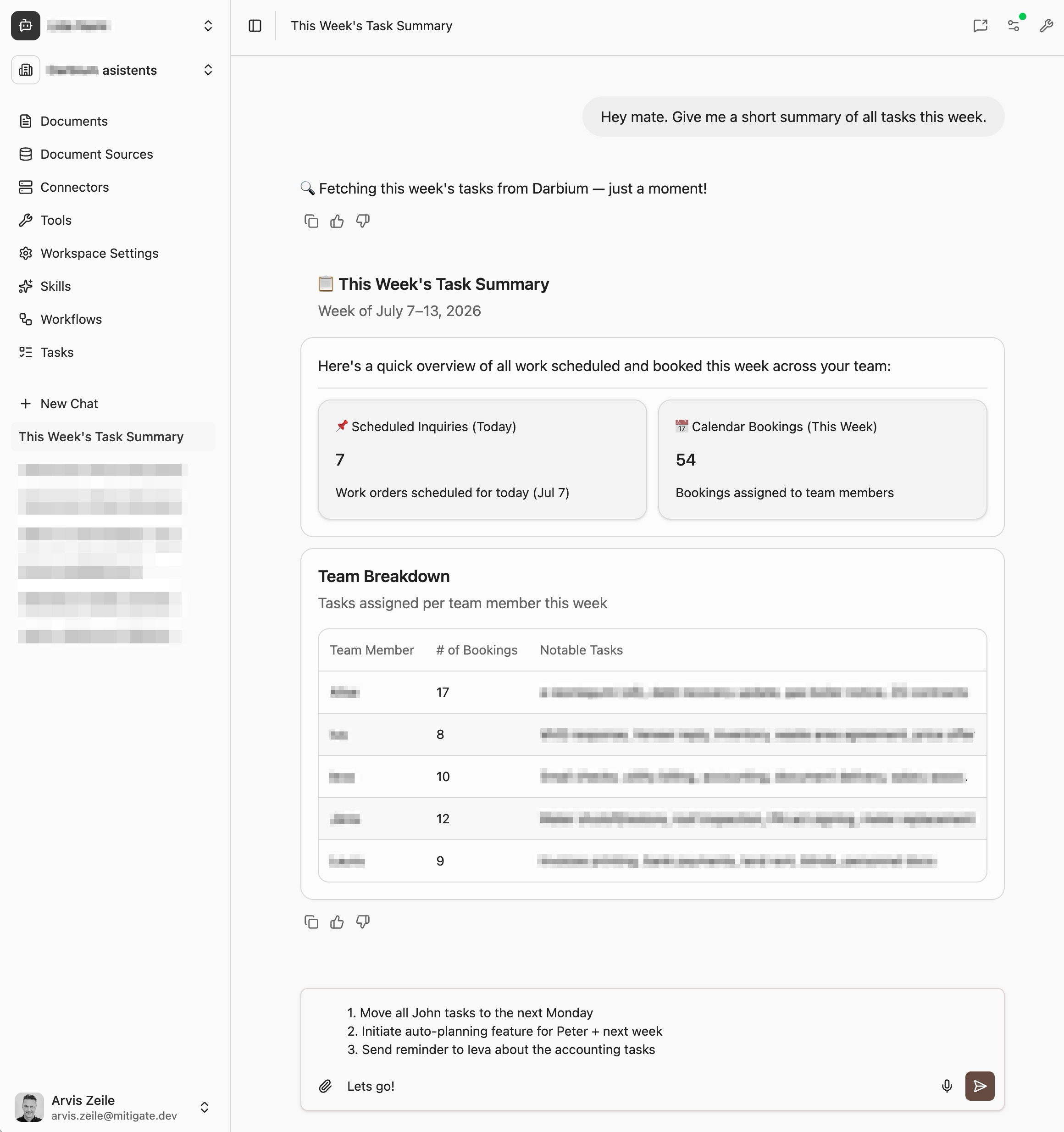
The agent version is not “do the same clicks faster.” That is usually the wrong model. The better model is to redesign the workflow around intent:
- The user describes the outcome.
- The agent checks the necessary systems.
- The agent prepares the action plan.
- The user approves sensitive steps.
- The agent executes through APIs, database procedures, or controlled automation.
- The agent writes back the result and leaves an audit trail.
The quality can improve because the agent follows the complete checklist every time. It does not skip the obscure validation field because it is in a different tab. It does not forget to attach the evidence file. It does not lose context between the CRM, ERP, and ticketing system.
The employee moves from operator to reviewer. That is a much better use of expertise.
The hard part is governance
The risk is not that agents can take action. That is the whole point. The risk is letting them take action without the same controls a serious enterprise system already requires.
A production agent for legacy software needs clear boundaries:
- Read access before write access. Start by letting the agent retrieve, compare, and prepare. Add write actions only where the workflow is understood.
- Human approval for material changes. Payments, contract updates, legal status changes, and customer-impacting actions should require confirmation.
- Least-privilege permissions. The agent should inherit or enforce the user’s access model, not bypass it.
- Structured actions. Important work should happen through typed tools, APIs, or controlled procedures, not vague screen scraping wherever possible.
- Audit logs. Every action should show the source data, the instruction, the tool call, the result, and the approving user.
Gartner has also warned that many agent projects will fail because of unclear value, cost, or inadequate risk controls. That warning is useful. It separates serious implementations from demos.
The goal is not to give an LLM unlimited access to the company. The goal is to give a well-scoped agent the same controlled access a trained employee would use, then make the process faster, more consistent, and easier to supervise.
What changes for the business
The first wave of enterprise software digitized paper processes. The next wave will remove the need for people to manually operate every step of those processes.
That does not mean the ERP disappears. It means fewer people need to know which tab contains the field, which export format works, or which sequence of screens must be completed before the submit button appears.
The legacy system remains the system of record. The agent becomes the system of action.
For many companies, that is the most practical path to modernization. Keep the systems that work. Connect them safely. Replace the long click paths with conversations, approvals, and audited execution.
The best interface for legacy software may not be a new UI at all. It may be an agent that knows the work, knows the systems, and can get the job done.
Want to see how this works with your legacy software? Get in touch and we will map one high-friction workflow into an agent-ready process.
Sources
- Gartner: 40% of enterprise apps will feature task-specific AI agents by 2026
- Gartner: Over 40% of agentic AI projects will be canceled by end of 2027
- McKinsey: The state of AI, 2025
- McKinsey: One year of agentic AI
- Asana: How work about work gets in the way of real work
- Pega: Employees switch apps over 1,100 times a day
- AAPL/HBR: How much time and energy do we waste toggling between applications?